You sell premium stainless steel water bottles, but your Amazon ads keep attracting shoppers searching for plastic bottles and replacement lids.
Every click costs money. And none of those shoppers may be looking for what you actually sell.
You could lower your bids, but that might also reduce traffic from buyers who genuinely want your product.
Amazon PPC negative keywords offer a more precise solution. They prevent your ads from appearing for unwanted search queries, helping you control wasted spending without shutting down entire campaigns.
The challenge is knowing which searches to block, which match type to use, and when the performance data actually supports that decision.
Here’s how to handle negative keyword targeting in 2026.
TL;DR: Amazon PPC Negative Keywords
- Find unwanted searches: Review your Sponsored Products Search Term Report for irrelevant or consistently inefficient queries.
- Choose the right match type: Negative exact blocks a specific query and close variations; negative phrase excludes queries containing the complete phrase or close variations.
- Use meaningful data: Amazon recommends reviewing performance after at least 20 clicks before making negative-targeting decisions.
- Check profitability: Compare spending with your target cost per acquisition, conversion history, and attributed sales.
- Apply exclusions carefully: Campaign-level negatives affect the entire campaign, while ad-group negatives provide narrower control.
- Avoid overblocking: Excluding relevant searches too early can reduce impressions and potential sales.
What Are Amazon PPC Negative Keywords?
Amazon PPC negative keywords are words or phrases that prevent your sponsored ads from appearing for selected customer searches.
Unlike regular keywords, which help your ads qualify for relevant searches, negative keywords tell Amazon which queries you don’t want to target.
For example, suppose you advertise a premium leather laptop bag.
Your ad appears for:
- Leather laptop bag
- Laptop bag for women
- Free laptop bag
- Laptop bag replacement strap
The first two searches may be relevant. But if you don’t offer free products or replacement straps, the others could waste advertising spend.
Adding carefully selected negative keywords can prevent similar unwanted searches from triggering your ads.
Amazon supports negative targeting in automatic and manual Sponsored Products campaigns. Its official targeting guide explains how advertisers can exclude keywords, products, and brands.
Negative Exact vs. Negative Phrase: What’s the Difference?
Amazon offers two negative keyword match types: negative exact and negative phrase.
Choosing the wrong one can block more traffic than intended.
| Match type | What it excludes | Best use |
|---|---|---|
| Negative exact | The specified search query and close variations | Blocking one particular unwanted search |
| Negative phrase | Searches containing the complete phrase or close variations | Blocking a consistently irrelevant group of searches |
Negative Exact Match Example
Suppose you add “plastic water bottle” as a negative exact keyword.
Amazon can exclude the search “plastic water bottle” and close variations.
However, a longer search such as “plastic water bottle with straw” isn’t automatically excluded simply because it contains those words.
Negative exact is useful when one particular query performs poorly but related searches might still be valuable.
Negative Phrase Match Example
Now suppose you add “replacement lid” as a negative phrase.
This can exclude searches such as:
- Replacement lid
- Water bottle replacement lid
- Replacement lid for travel bottle
That’s useful if your business doesn’t sell replacement lids at all.
Amazon’s negative keyword documentation specifies these limits:
- Negative phrase: Up to 4 words and 80 characters.
- Negative exact: Up to 10 words and 80 characters.
Practical tip: When only one query has proven inefficient, negative exact is often the safer starting point. Use negative phrase when the entire search concept is irrelevant.
How to Find Negative Keywords on Amazon
The best negative keyword candidates usually come from your actual advertising data—not a generic list downloaded online.
Step 1: Open Your Search Term Report
Sign in to Amazon Ads Campaign Manager and review the Search Terms section for your Sponsored Products campaigns.
You can also generate a Sponsored Products Search Term Report from the reporting tools.
According to Amazon’s May 2026 reporting documentation, this report shows customer searches that generated at least one click.
Review the following metrics:
- Customer search term
- Clicks and advertising spend
- Average cost per click (CPC)
- Ad-attributed orders and sales
- Advertising cost of sales (ACoS)
- Conversion rate, where available or calculated
The report may also contain ASINs representing product-detail-page advertising opportunities.
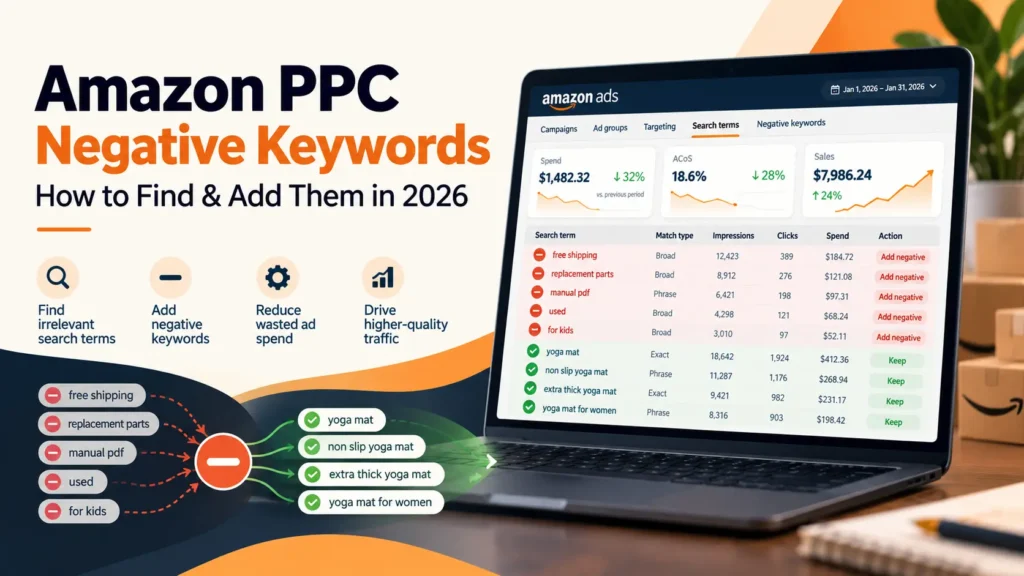
Step 2: Identify Irrelevant Searches
Start with queries that clearly don’t match your products.
For example:
| Customer search term | Product advertised | Suggested action |
|---|---|---|
| Plastic water bottle | Stainless steel bottle | Consider excluding |
| Water bottle replacement lid | Complete bottle only | Consider excluding |
| Insulated hiking bottle | Insulated bottle | Keep and evaluate |
| Stainless steel bottle 32 oz | Matching 32 oz product | Keep and monitor |
These are illustrative decisions. Product compatibility, intended buyers, and actual conversion data should guide the final exclusions.
Step 3: Review Searches That Spend Without Sales
A relevant search can still become unprofitable.
But don’t turn every zero-sale query into a negative keyword.
Amazon recommends evaluating a target after it receives at least 20 clicks. That’s a useful review point, not an automatic exclusion rule.
Consider a product with:
- Average order value: $40
- Target ACoS: 20%
- Target acquisition cost: $8
The target acquisition cost is:
$40 × 20% = $8
If a search term spends $16 without an attributed order, it has consumed twice your target acquisition cost.
That warrants investigation.
Before excluding it, check whether the search is relevant, whether sales attribution is complete, and whether the product listing itself is affecting conversions.
You can review the decision again after more data accumulates.
How to Add Negative Keywords in Amazon Ads
Once you’ve identified the queries to exclude, adding them is straightforward.
- Sign in to your Amazon Ads account.
- Open Campaign Manager and select the relevant Sponsored Products campaign.
- Navigate to the Negative keywords section for campaign-wide exclusions.
- To apply an exclusion only to a particular ad group, open that ad group and locate Negative targeting.
- Enter your negative keyword.
- Select Negative Exact or Negative Phrase.
- Save your changes and review the targeting settings.
Amazon’s interface labels may vary by account or interface version. Its official setup instructions also explain bulk negative-keyword uploads.
Campaign-Level vs. Ad-Group-Level Negatives
The exclusion level determines how broadly your negative keyword applies.
Campaign-level negatives block matching traffic across the campaign. They’re useful when a search is irrelevant to every advertised product in that campaign.
Ad-group-level negatives apply only to the selected ad group. They’re useful when a query is unwanted for one product but relevant to another.
For example, “replacement lid” may be irrelevant to your complete-bottle ad group but valuable to an ad group selling replacement accessories.
Blocking it across the entire campaign could remove useful opportunities.
Should You Use Negative Product Targeting Too?
Yes, when product-detail-page placements are consuming spend without supporting your goals.
Negative keyword targeting controls unwanted search queries. Negative product targeting lets advertisers exclude specific products or brands from eligible advertising opportunities.
Suppose your premium laptop bag ad appears alongside an incompatible laptop accessory.
If that placement repeatedly attracts irrelevant clicks, excluding the relevant ASIN may make more sense than adding another negative keyword.
Amazon explains this option in its Sponsored Products best-practices guide.
Common Negative Keyword Mistakes to Avoid
1. Blocking Relevant Searches Too Early
A keyword with five clicks and no sales hasn’t necessarily failed.
Evaluate relevance, conversion history, spending, and attribution before excluding potentially valuable traffic.
2. Using Negative Phrase Too Aggressively
Negative phrase can remove many searches at once.
Before adding it, consider whether longer search variations might still bring qualified buyers.
3. Adding Every Negative at Campaign Level
An exclusion suitable for one product may be harmful to another.
Use ad-group-level control when products serve different customer needs.
4. Never Reviewing Existing Exclusions
Your catalog changes. A search that was irrelevant last month may become useful after launching a new product.
Review negative keyword lists periodically and remove exclusions that no longer fit your strategy.
How Alpha Spikes Helps Reduce Wasted Amazon PPC Spend
Negative keywords are one part of managing advertising efficiency.
If several campaigns are spending heavily without producing profitable orders, the issue may involve campaign structure, keyword selection, bids, or product-page conversion—not just missing exclusions.
Alpha Spikes provides Amazon PPC management services, including search-term analysis, negative keyword management, bid optimization, and campaign restructuring.
A structured PPC audit can help identify where advertising budgets are being spent inefficiently and which problems deserve attention first.
Frequently Asked Questions
Do Amazon negative keywords improve ACoS?
They can help reduce spending on irrelevant or inefficient searches. However, a lower ACoS isn’t guaranteed, and excluding valuable traffic can reduce sales.
Can I add negative keywords to automatic campaigns?
Yes. Amazon supports negative targeting in both automatic and manual Sponsored Products campaigns.
Can I remove negative keywords later?
Yes. You can edit your negative targeting settings and remove exclusions when they’re no longer appropriate.
How often should I review negative keywords?
A weekly review can work for active campaigns with meaningful traffic. Lower-volume campaigns may need longer evaluation periods. Avoid making final decisions using incomplete advertising data.
Final Thoughts
Negative keywords work best when they’re based on what shoppers actually search for and how those searches perform.
Review your Search Term Report, identify irrelevant queries, and use the narrowest exclusion that solves the problem.
Don’t remove a promising search simply because it hasn’t converted yet. Check its relevance, spending, and available conversion data first.
A careful negative keyword strategy can help keep more of your advertising budget available for searches that genuinely match your products.