Your Amazon Ads dashboard shows 10 orders. Not bad, right?
Now look at what those orders actually cost you.
You spent $120 on 100 clicks to sell ten products priced at $40 each. That’s $400 in advertising sales and a 30% ACoS. If your break-even ACoS is also 30%, those orders have left you with no contribution profit after advertising.
And here’s the frustrating part: your campaign can keep generating sales while quietly eating into your margins.
The problem isn’t always your product or your advertising budget. Sometimes, you’re simply paying too much for the traffic you’re getting.
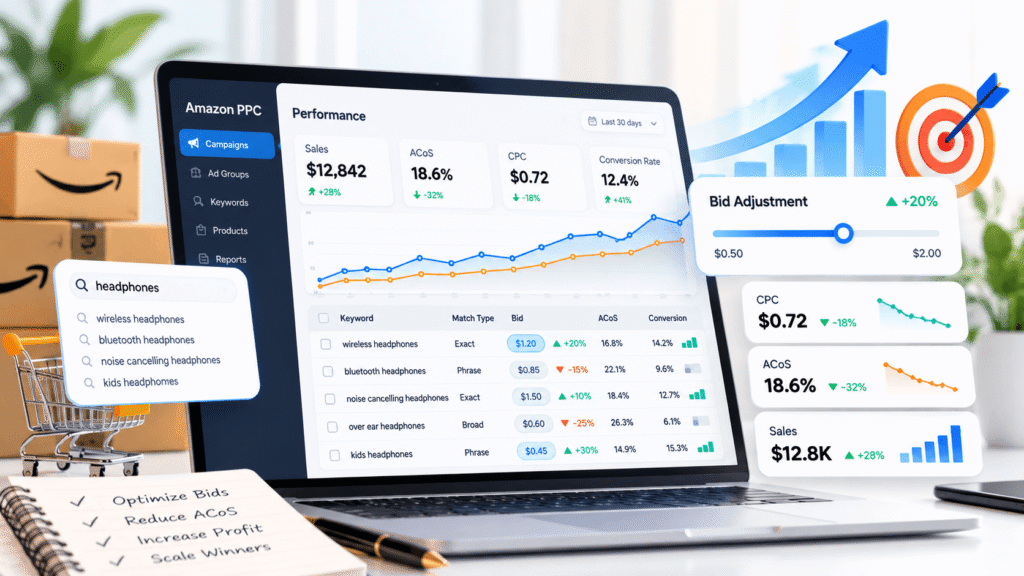
That’s where Amazon PPC bid optimization comes in. By adjusting keyword and product-targeting bids based on conversion rates, advertising costs, and profitability, you can identify which clicks deserve more investment and which are costing you money.
But before changing bids, you need to understand how Amazon’s bidding strategies, match types, placement adjustments, and sales attribution work together.
Let’s get into the numbers that actually matter.
TL;DR: How to Optimize Amazon PPC Bids in 2026
Amazon PPC bid optimization helps sellers control advertising costs by adjusting keyword and product-targeting bids based on conversion rates, ACoS, and profitability. Here’s what matters most:
- Calculate profitable bids: Determine your break-even ACoS, then estimate target CPC using Average Order Value × Conversion Rate × Target ACoS. For example, $40 × 10% × 20% = $0.80 target CPC.
- Optimize by match type: Use broad and phrase match to discover search opportunities, then manage proven converting terms through exact-match targeting.
- Set clear review thresholds: Investigate zero-sale targets after spending around 2× your target acquisition cost or reaching approximately 3 ÷ expected conversion rate clicks. These are testing guidelines, not automatic pause rules.
- Allow for delayed sales: Sponsored Products uses 7-day click attribution for sellers and 14-day attribution for vendors. Reported sales can also take up to 48 hours to populate.
- Check bid multipliers: Review dynamic bidding, placement adjustments, and ASIN targeting before increasing base bids.
- Measure profitable growth: Track CPC, ACoS, TACoS, conversions, and contribution profit. Make controlled bid changes and review their impact using sufficiently mature data.
How Does Amazon PPC Bidding Work?
Amazon Sponsored Products uses a cost-per-click auction. You set a bid for a keyword or product target, and Amazon determines eligible advertising opportunities based on factors including relevance and bidding.
Your entered bid is not necessarily your final CPC.
Amazon’s Sponsored Products bidding documentation, updated in September 2026, explains the available strategies:
| Bidding strategy | How it works | When to consider it |
|---|---|---|
| Dynamic bids – down only | Amazon may lower bids by up to 100% for opportunities less likely to convert. | New campaigns or tighter budgets |
| Dynamic bids – up and down | Amazon may increase or decrease bids by up to 100% based on predicted conversion likelihood. | Established, conversion-focused campaigns |
| Fixed bids | Uses your base bid without dynamic changes, although placement adjustments can apply. | More controlled testing |
| Rule-based bidding | Adjusts bids toward ROAS objectives in eligible campaigns. | Accounts with defined return targets |
There’s no single setting that works for every ASIN. A campaign selling a high-margin premium product may support more aggressive bidding than one selling a low-margin household item.
How to Calculate a Profitable Amazon PPC Bid
Before deciding what to bid, calculate how much you can afford to spend on each sale.
Step 1: Calculate Break-Even ACoS
Break-even ACoS = (Contribution Profit Before Advertising ÷ Selling Price) × 100
Consider a product with these economics:
| Product economics | Amount |
|---|---|
| Selling price | $40 |
| Product, fulfillment, and other variable costs | $28 |
| Contribution profit before ads | $12 |
| Break-even ACoS | 30% |
At a 30% ACoS, advertising consumes the entire $12 contribution profit.
If you want to retain some profit, you might choose a 20% target ACoS instead, assuming the calculation includes all relevant variable costs.
Step 2: Calculate Target CPC
Target CPC = Average Order Value × Conversion Rate × Target ACoS
Suppose your product has:
- Average order value: $40
- Advertising conversion rate: 10%
- Target ACoS: 20%
Target CPC = $40 × 0.10 × 0.20 = $0.80
That gives you a target average CPC of $0.80 based on current assumptions.
It doesn’t mean your base bid must be exactly $0.80. Amazon’s dynamic bidding and placement adjustments can change auction bids and the CPC you actually pay.
When Should You Lower a Bid? Use a Click-Based Decision Rule
This is where many PPC guides become vague. They tell you to wait for enough data without explaining what that means.
A useful starting point is your product’s historical advertising conversion rate.
Zero-sale review threshold ≈ 3 ÷ Expected Conversion Rate
Use the conversion rate as a decimal.
| Expected conversion rate | Approximate clicks with zero sales before a stronger warning |
|---|---|
| 5% | 60 |
| 10% | 30 |
| 15% | 20 |
Why multiply by three?
Under a simplified model where each click has an independent, constant chance of converting, reaching roughly three times the expected clicks per order with zero conversions would be unusual—about a 4–5% probability.
That makes the threshold useful for investigation, although it doesn’t prove a keyword will never convert.
You also need a financial spending limit.
Using our $40 product with a 20% target ACoS:
Target cost per acquisition = $40 × 20% = $8
If a keyword spends $16 without generating an attributed sale, you’ve already spent twice your target acquisition cost.
That’s a reasonable point for an early review, even if the keyword hasn’t reached 30 clicks.
A practical approach is to review a zero-sale target when either:
- It reaches approximately 2× your target acquisition cost in spend; or
- It reaches 3 ÷ expected conversion rate clicks without an order.
The first is a financial warning. The second is a stronger performance warning.
After checking attribution and search relevance, consider lowering the bid, restricting the target, or pausing it when the evidence supports that decision.
These are suggested operating thresholds, not official Amazon rules. New products, seasonal demand, small datasets, and changing conversion rates require judgment.
Don’t Ignore Amazon’s Sales Attribution Delay
A click without an immediately reported sale isn’t necessarily unsuccessful.
Amazon’s attribution documentation specifies a seven-day Sponsored Products click-attribution window for sellers and a 14-day window for vendors and authors.
Amazon also notes that sales metrics may take up to 48 hours to populate.
For final performance decisions, examine sufficiently mature click cohorts. Recent clicks may still generate attributed orders, so avoid treating yesterday’s zero-sale data as final.
Optimize Bids by Keyword Match Type
Broad, phrase, and exact match don’t offer the same level of search-query control.
Amazon’s keyword targeting guide explains how each works.
| Match type | Main purpose | Suggested bid approach |
|---|---|---|
| Broad | Discover related searches | Start cautiously and review search terms frequently |
| Phrase | Reach more closely related queries | Adjust based on query relevance and conversions |
| Exact | Focus on a specific query and close variants | Give profitable, proven terms independent bid control |
These are starting approaches, not automatic rules that exact bids must always exceed broad bids.
For example, a broad-match keyword for “insulated water bottle” could uncover a converting search such as “leakproof insulated bottle for hiking.”
You can add that term to an exact-match campaign and set its bid using its own conversion performance.
Review whether negative exact targeting is appropriate in the discovery campaign to reduce unwanted overlap. Don’t blindly exclude every harvested term; check how doing so affects traffic and performance.
Structure Campaigns Around Different Bidding Goals
Putting every targeting method into one poorly organized campaign makes bid optimization harder.
For established products, consider separating:
- Automatic targeting: Discover search terms and product opportunities.
- Broad and phrase targeting: Test relevant search variations.
- Exact-match targeting: Manage proven queries with more specific bids.
- Product targeting: Reach shoppers browsing selected products or categories.
Branded and non-branded terms may also deserve separate campaigns because their conversion behavior and goals can differ considerably.
Keep products with substantially different margins separate where practical.
Amazon’s Sponsored Products targeting guide supports using targeting reports to identify successful keywords and product targets.
Don’t Forget ASIN and Category Targeting
Keyword bids aren’t your only bidding decisions.
Product targeting lets you advertise against individual ASINs or relevant categories.
For example, if your product is a $40 kitchen tool, you might test targeting competing kitchen products within a similar price range.
Review their clicks, costs, and attributed sales separately from keyword campaigns.
If one competing ASIN converts profitably, it may deserve a higher bid. If an entire category consumes spend without meaningful results, narrow its targeting or reduce exposure.
Check Placement Adjustments Before Raising Bids
A $1 keyword bid doesn’t necessarily represent your maximum eligible auction bid.
Suppose you’re using:
- Base bid: $1.00
- Top-of-search adjustment: +50%
- Dynamic upward adjustment: +100%
Under these assumptions, the potential adjusted auction bid becomes:
$1.00 × 1.50 × 2.00 = $3.00
That isn’t the CPC you’re guaranteed to pay. It illustrates how auction bids can increase when multiple settings apply.
Amazon’s September 2026 placement guidance also describes rest-of-search, product-page, and eligible audience adjustments.
Review placement-level ACoS, CPC, and conversion rates before increasing modifiers. A placement producing more sales isn’t necessarily the most profitable one.
Real Case Study: How Campaign Restructuring Reduced ACoS
Bid optimization becomes more useful when it works alongside proper campaign organization.
In a published kitchen-and-home client case study, Alpha Spikes reports restructuring Amazon campaigns by product category and search intent, refining bids using conversion data, and moving high-performing terms into Exact Match campaigns.
The agency reports the following results from a 90-day engagement:
| Metric | Before | After |
|---|---|---|
| Advertising ACoS | 36% | 25% |
| Relative ACoS reduction | — | Approximately 30% |
The work also included listing SEO and A+ Content improvements.
What can we learn from this?
Campaign restructuring and more precise targeting can be important parts of improving advertising efficiency. However, the reported ACoS change cannot be attributed to bid adjustments alone because several changes occurred during the engagement.
Measure TACoS Alongside ACoS
ACoS tells you how much advertising costs relative to ad-attributed sales.
ACoS = Ad Spend ÷ Ad-Attributed Sales × 100
TACoS compares advertising costs against all Amazon sales.
TACoS = Ad Spend ÷ Total Amazon Sales × 100
Suppose your account spends $800 on advertising, generates $4,000 in ad-attributed sales, and records $10,000 in total sales.
Your ACoS is 20%, while TACoS is 8%.
Tracking both helps you see advertising efficiency alongside overall business performance.
A falling TACoS with stable or growing revenue may be encouraging, but it doesn’t prove advertising caused organic sales to rise. Pricing, seasonality, brand demand, and other factors also matter.
When Professional PPC Management Can Help
As your catalog expands, managing keyword bids, ASIN targeting, campaign budgets, and placement adjustments takes more time.
The problem isn’t always the bid itself. Sometimes campaign overlap, irrelevant searches, or poor listing conversion is responsible for rising advertising costs.
Alpha Spikes offers Amazon PPC management services, including campaign restructuring, keyword research, negative targeting, bid management, and performance analysis.
If your account is spending heavily without meeting profitability targets, a PPC audit can help identify which campaigns, placements, and targets deserve attention first.
Frequently Asked Questions
How often should you optimize Amazon PPC bids?
Review spending and campaign issues regularly, with deeper bid evaluations every one or two weeks as a starting point. Amazon recommends reviewing dynamic bidding performance approximately every two weeks. High-volume campaigns may support faster decisions, while lower-volume targets need more time.
Should exact-match keywords have higher bids?
Not automatically. Exact match gives you more control over the queries you’re targeting, but its bid should still depend on CPC, conversion rate, margins, and available traffic.
Why do Amazon PPC campaigns have high ACoS?
Common causes include expensive clicks, irrelevant search terms, weak conversion rates, aggressive placement adjustments, and product margins that cannot support current acquisition costs. Review these factors before making large bid reductions.
Final Thoughts
When reviewing Amazon PPC bids, start with three questions: How much can this product afford per order? Is the traffic converting at that cost? And are campaign settings increasing bids beyond what you intended?
Use those answers to decide which targets deserve more exposure and which need changes.
Regular bid reviews matter, but so do campaign structure, listing quality, and accurate attribution data. Fixing the source of wasted spending is more useful than changing bids simply because a dashboard metric moved.